
Rocket Money - Bills & Budgets
Rocket Money - Bills & BudgetsFinance
4.541.89K Reviews
- Version
- 17.2.0
- Installs
- 10.00M
- Age Rating
- Everyone
Screenshots
Our Review of Rocket Money - Bills & Budgets
 Analysis by Appyee
When I want to understand why my balance seems to shrink faster than expected, I start by looking at recurring bills, everyday spending, and the small charges I might have forgotten about. Rocket Money - Bills & Budgets brings those jobs together in a personal finance app from Rocket Money - Bills & Budgets. Its aim is practical: help me spot patterns, keep a budget in view, and decide which recurring costs deserve attention. It is free to download, though some in-app purchases range from $0.99 to $59.99 per item, so I would check the available options before relying on a paid feature.
From a messy money picture to a clearer routine
The first decision is whether I am comfortable connecting financial accounts to an app. Linking accounts can make spending review more convenient, but it is not essential to everyone’s approach to money. I would take a moment to understand the connection flow and decide whether the convenience is worth having financial activity gathered in one place. If I prefer to keep everything manual, a spreadsheet or a bank’s own tools may feel like a better fit.
After accounts are connected, the useful work is not simply watching transactions appear. I would review the categories and treat them as a first draft, not a verdict. A purchase can be easy to misread when a merchant name is unfamiliar, and a single category mistake can make a budget look more alarming or more comfortable than it really is. Checking unusual entries early gives the monthly picture a better chance of matching real life.
Build a routine around the information
I find it more helpful to use a finance app at a regular moment than to keep checking it throughout the day. A brief weekly review gives me time to notice a subscription, compare spending with the budget, and decide whether anything needs follow-up. That is a more useful habit than reacting to every notification. Notifications can bring attention to a change, but they cannot tell me whether that change is important in the context of my plans.
For example, if I am trying to keep grocery spending steady, I would first look at the transactions grouped under that category and check that they belong there. Then I could compare the total with the budget I set and decide whether to change my spending or adjust the budget because this month is unusual. That distinction matters: a budget should help me make a decision, not make an ordinary one-off expense feel like a failure.
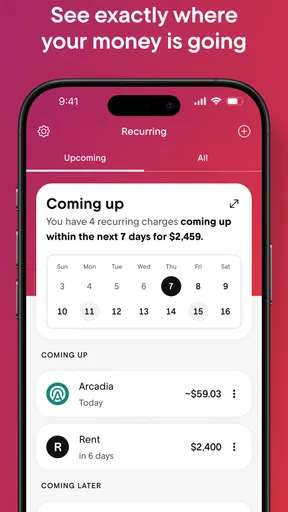
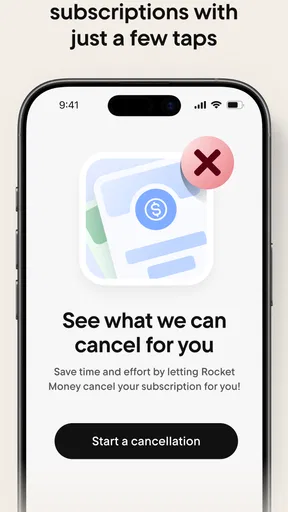
Subscriptions call for a different kind of review. I would use the tracker to make a list of recurring charges, then check each one against the service I actually use and the account that pays for it. Seeing a charge is only the first step; before cancelling, I would confirm whether I still need the service, whether another household member uses it, and how the provider handles cancellation. This small pause helps avoid cancelling something useful just because its renewal was easy to overlook.
Use bill negotiation as a handoff, not a guarantee
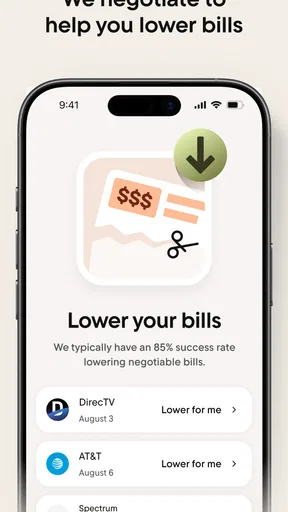
The bill negotiation feature is appealing because it offers help with an awkward task many people put off. I would approach it as a handoff: the app may take on part of the effort, but I still need to understand the bill, consider any terms that matter to me, and review the outcome. A possible reduction is not the same as a guaranteed saving, so I would not build a budget around money I have not actually saved.
It is also worth deciding which bills are suitable for this kind of assistance. A recurring service with a clear monthly charge is easier to assess than a bill that changes because of usage or a temporary circumstance. I would compare the current bill with my own records and make sure I understand any change before accepting it. The main value is reducing the time and friction involved in pursuing a lower bill, not removing the need to make a considered choice.
Where the overview helps—and where it can fall short
A consolidated money view is most useful when it changes what I do next. I might notice that several small renewals land close together, move a planned purchase to a later week, or make a budget more realistic after seeing how I actually spend. The app can bring those details into view, while the decisions remain mine. I would treat the dashboard as a prompt for questions rather than a complete judgement of my financial health.
There is a trade-off in any automated categorization: it saves effort, but it may not understand the context behind every transaction. Likewise, a budget can only be useful if I set categories and limits that reflect my habits. If the first setup is too strict, I may ignore the alerts; if it is too loose, it may not help me notice a problem. I would start with a few categories that matter most, then refine them after seeing how they work in practice.
Who will get the most from it
I would recommend this approach to someone who has recurring charges spread across several services, wants a clearer view of everyday spending, or tends to postpone reviewing bills. It can also suit a budgeting beginner who would rather start with a visible record of transactions than build a detailed tracking system from scratch. The combination of expense tracking, budgets, subscription review, and bill negotiation gives a practical sequence: notice a cost, decide whether it belongs, and take action where it makes sense.
On the other hand, someone who avoids connecting accounts, wants complete control over every entry, or already follows a detailed spreadsheet routine may not gain enough to justify changing habits. A bank’s built-in spending tools may be sufficient for a quick transaction overview, while a spreadsheet can offer more control over custom categories and long-term planning. I would choose this app for convenience and recurring-cost awareness, not because an automated overview replaces careful recordkeeping or financial advice.
What to expect before making it part of your routine
The app is rated for Everyone and has a 4.6 average from around 125,000 ratings, with more than 10 million installs. Those figures suggest broad use, but they do not tell me whether its workflow will suit a particular person. I would pay more attention to whether account connection, category review, and the available budgeting tools fit the way I prefer to manage money. Its current version is 12.12.1, and it supports iOS 9 or later.
A common practical question is whether I can use it without paying. It is free to download, while in-app purchases are listed from $0.99 to $59.99 per item. I would look at the feature I plan to use and its terms in the app before making a decision, especially if I am interested in bill negotiation or other tools that may involve an additional purchase. That keeps the expected cost clear rather than assuming every feature works the same way at no charge.
Another question is what to do if a transaction looks wrong or a subscription is unfamiliar. I would first compare the entry with the relevant bank or card record, then identify the merchant and check whether the charge belongs to a service I or someone in my household uses. I would not rely on a category label alone to decide that a payment is unauthorised. For an actual account or billing issue, I would follow up with the financial institution or service provider responsible for the charge.
Getting Started with Rocket Money
First off, setting up Rocket Money is a breeze. Once you download it, you just need to connect your bank accounts and credit cards. Don’t worry, it’s super secure. The app uses bank-level encryption to keep your info safe. I know, security is a big deal, and these guys seem to have it covered.
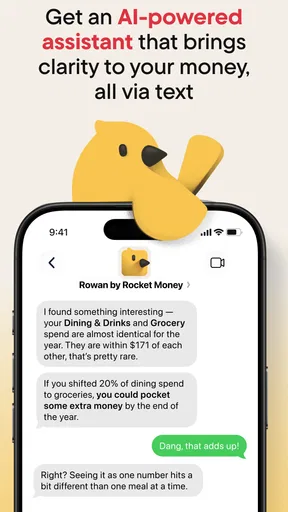
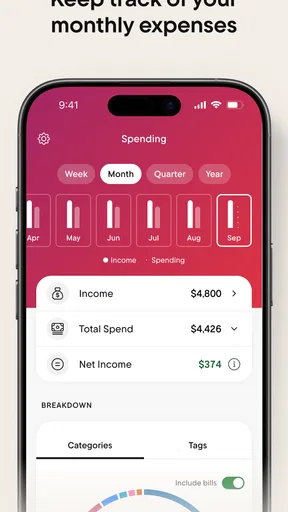
Right after linking your accounts, Rocket Money starts analyzing your transactions. It’s like having a personal finance assistant right in your pocket. The app automatically categorizes your spending, which is pretty neat. You’ll finally see where all your money is going — maybe too much on takeout? Guilty as charged!
Features That Make Life Easier
One of the coolest features is the subscription tracker. Ever signed up for a free trial and forgot to cancel? Yep, been there. Rocket Money identifies all your subscriptions and even suggests ones you might want to cancel. It’s like having a financial detective looking out for you.
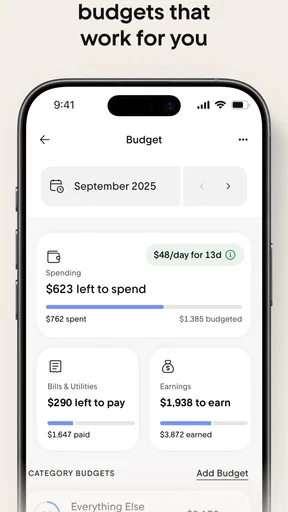
Another highlight is the budgeting tool. You can set up budgets for different categories like groceries, entertainment, or whatever suits your lifestyle. The app sends you notifications to keep you on track. No more end-of-the-month surprises when you realize you’ve overspent.
Let’s not forget about the bill negotiation feature. This one’s a gem. If you're overpaying on bills, Rocket Money can negotiate on your behalf to lower them. I didn’t even know this was possible, but it’s a fantastic way to save without lifting a finger.
The User Experience
The design of the app is sleek and intuitive. Everything is where you’d expect it to be, and it’s super easy to navigate. Even if you’re not tech-savvy, you’ll find it straightforward. The dashboard gives you a quick glance at your financial health, which I find really motivating.
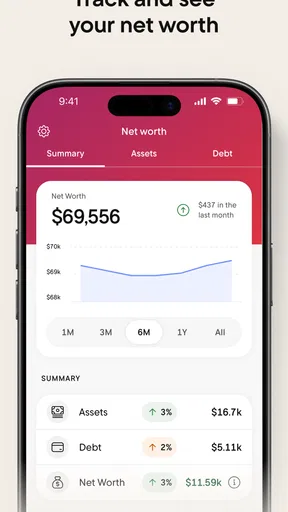
Speaking of motivation, the app also has a net worth tracker. Watching your net worth grow (or fluctuate) is surprisingly satisfying. It’s a great way to stay motivated and keep your financial goals in check.
Who Is Rocket Money For?
If you’re someone who’s looking to get a grip on your finances, this app is for you. Whether you’re a budgeting newbie or a seasoned pro, there’s something in it for everyone. The app is designed to make financial management accessible and stress-free.
It’s particularly useful if you have multiple subscriptions or struggle with sticking to a budget. And honestly, who doesn’t need a little help with that? Plus, the bill negotiation feature is a lifesaver for anyone looking to cut costs without the hassle.
Final Thoughts
All in all, Rocket Money - Bills & Budgets is a fantastic tool for managing your personal finances. It’s packed with features that are genuinely useful and takes the stress out of budgeting. The app has definitely earned a permanent spot on my phone.
If you’re ready to take control of your finances, give Rocket Money a try. It might just be the financial buddy you never knew you needed. Happy budgeting!
Privacy and Permissions
See what permissions an app requests and how it handles your data.
- Photos/Media/Files
- read the contents of your USB storage, modify or delete the contents of your USB storage
- Storage
- read the contents of your USB storage, modify or delete the contents of your USB storage
- Camera
- take pictures and videos
- Microphone
- record audio
- Wi-Fi connection information
- view Wi-Fi connections
- Other
- view network connections, change network connectivity, full network access, run at startup, draw over other apps, control vibration, prevent device from sleeping, Google Play license check
Verdict
Strengths of Rocket Money - Bills & Budgets
- Intuitive interface for easy navigation.
- Comprehensive budget tracking tools.
- Automatic bill reminders reduce late fees.
- Customizable spending alerts.
- Secure data encryption for peace of mind.
Limitations of Rocket Money - Bills & Budgets
- Limited features in the free version.
- Occasional bugs in transaction syncing.
- Subscription can be pricey for some.
- No desktop version available.
- Requires bank account linking.
Similar Picks in This Category
View All
Google Wallet
Google LLC4.3

Airtel: Recharge, Bank & Loans
Airtel4.0

PayPal - Pay, Send, Save
PayPal Mobile4.2

DANA Indonesia Digital Wallet
PT Espay Debit Indonesia Koe4.5

Binance: Buy Bitcoin & Crypto
Binance Inc.4.8

Cash App
Block, Inc.4.7
Frequently Asked Questions
What is Rocket Money and how does it work?
Rocket Money is a financial management app designed to help users track their expenses, manage bills, and maintain budgets. By linking your bank accounts and credit cards, Rocket Money provides a comprehensive view of your financial health. It categorizes transactions, offers insights on spending habits, and alerts you to upcoming bills, helping you stay organized and in control of your finances.
Is Rocket Money safe to use with my financial information?
Yes, Rocket Money uses bank-level security measures to protect your financial data. It employs encryption and secure data access protocols to ensure your information is safe. Additionally, Rocket Money is read-only, meaning it cannot move money out of your accounts, providing an extra layer of security and peace of mind for users.
Does Rocket Money offer subscription management features?
Absolutely. Rocket Money excels at identifying and managing your subscriptions. It can detect recurring payments and subscriptions, allowing you to cancel unwanted services directly through the app. This feature is particularly useful for users looking to cut down on unnecessary expenses and streamline their monthly budgets.
Is Rocket Money free, or does it require a subscription?
Rocket Money offers a free version with basic features, which is suitable for tracking expenses and setting budgets. However, for more advanced features such as subscription cancellations and premium insights, there is a paid subscription option. The pricing is competitive and offers added value for users who need comprehensive financial management tools.
Can Rocket Money help with bill negotiations?
Yes, one of the standout features of Rocket Money is its bill negotiation service. The app can help negotiate lower rates on your bills, potentially saving you money. This is done by Rocket Money's team, who contacts your service providers on your behalf to secure better deals, making it a valuable tool for cost-conscious users.
